Your holding structure. Your cap table. The same canvas.
Modélise et simule la répartition du capital : fondateurs, BSPCE/ESOP, rounds successifs, dilution, liquidation preference. Comparaison de scénarios, snapshot versionnable, prêt à exporter pour le pacte. Pensé pour les fondateurs et leur avocat / VC.
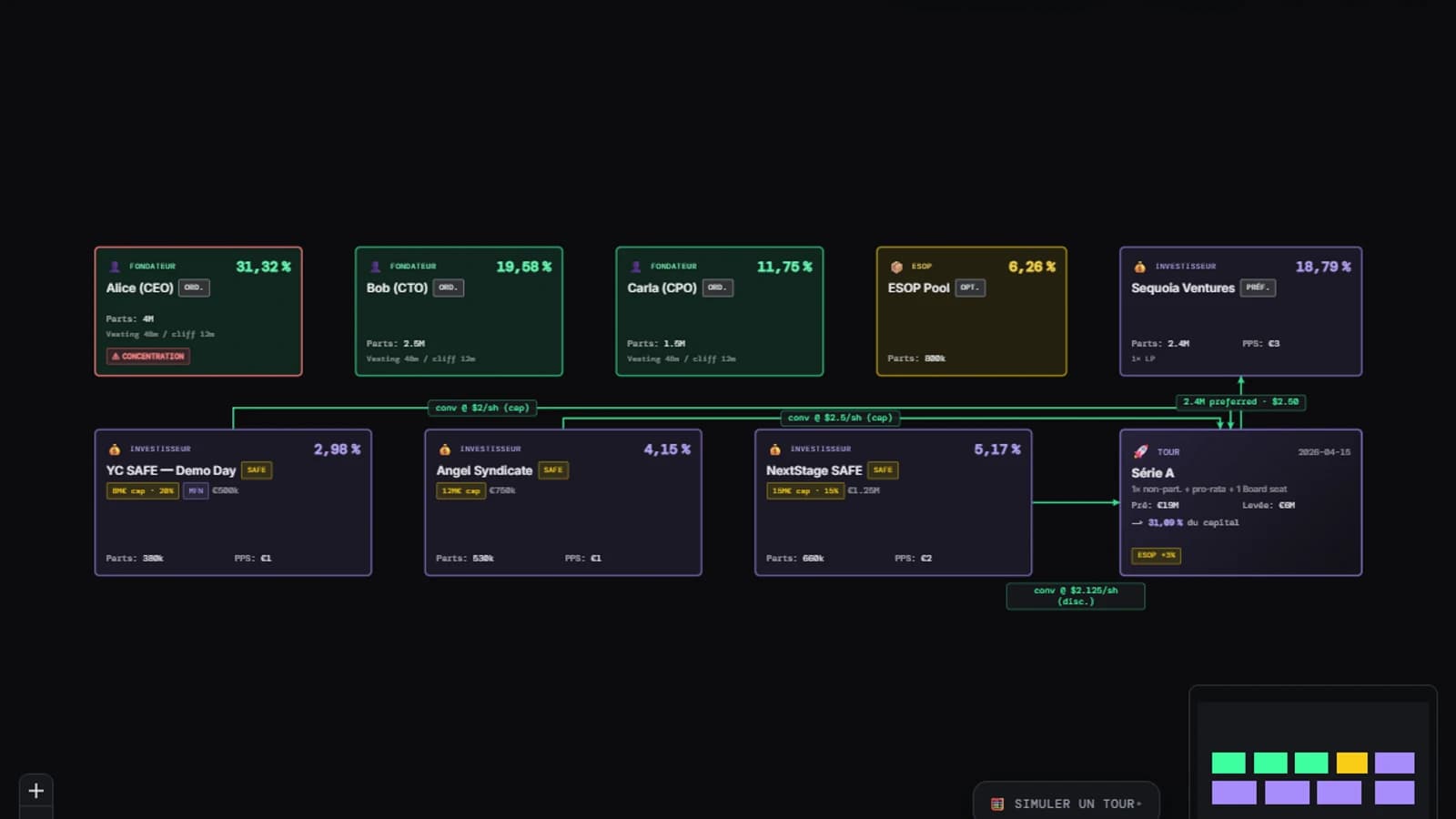
What-if simulator on the canvas
Adjust the pre-money valuation and the amount raised — every founder's, investor's, and the ESOP pool's dilution recalculates LIVE, on the schema itself. Nothing is written until you explicitly ask for it.
Structure AND capital, one schema
A holding org chart and its cap table live separately everywhere else. At OrgGen, entity hierarchy and equity split are the same canvas — no more manual sync between two tools.
SAFE, liquidation preferences, ESOP
Cap, discount, MFN on SAFEs; multiple and participation on liquidation preferences; per-round ESOP pool refresh. The conversion and waterfall engine is deterministic and tested.
Automatic alerts
Down-round, a holder concentrated above 30%, 'underwater' stock options, triggered anti-dilution — risks show up as a badge on the affected block, before your lawyer finds them.
Multi-entity, nested holdings
Subsidiaries under a holding, multi-level group structure — the cap table stays attached to every entity in the hierarchy. OrgGen's native use case, not a workaround.
Versioned history
Every schema snapshot captures the cap table as it stood at the time. Compare two versions, restore an earlier state before committing to a term sheet.
Why not just a spreadsheet or another Carta?
Classic cap table tools simulate in a spreadsheet — your holding org chart lives elsewhere, in a separate doc nobody keeps up to date. OrgGen does both in one place: your entity hierarchy (holding, subsidiaries) AND each one's equity split, on a single visual canvas you generate by chatting. The what-if simulator adjusts dilution live on the blocks themselves — no manual sync between two tools. And because the same cap table is open to your agent over MCP, it can model a round, an exit, or a SAFE conversion, or refresh the fundraising package — you review, you sign off.
Prompts to try
Copy-paste into the chat — OrgGen produces an editable diagram.
Frequently asked questions
Can I model a funding round or run the cap table from an agent (Claude Code/Cursor)?
Yes, over MCP: your agent can model a round, an exit, or a SAFE conversion — by default nothing is written, simulation mode shows you the result before you decide to persist it.
Is the cap table linked to the org chart, or a separate tool?
The same canvas: your entity hierarchy (holding, subsidiaries) and each one's equity split live in the same place. No manual sync between two tools.
Does the what-if simulator change my real data?
No, by default: dilution recalculates LIVE on the displayed schema, but nothing is written until you explicitly ask for it.
Can I manage several subsidiaries under one holding in a single cap table?
Yes: multi-level group structure, each entity keeps its own cap table tied to its position in the hierarchy — OrgGen's native use case, not a workaround.
Ready to visualize your holding structure?
Describe your cap table in natural language — OrgGen produces an editable, simulatable schema.
Get started